
Lesson type
Difficulty level

This lecture presents the Medical Informatics Platform's data federation in epilepsy.
Difficulty level: Intermediate
Duration: 27:09
Speaker: : Philippe Ryvlin

This lecture aims to help researchers, students, and health care professionals understand the place for neuroinformatics in the patient journey using the exemplar of an epilepsy patient.
Difficulty level: Intermediate
Duration: 1:32:53
Speaker: : Randy Gollub & Prantik Kundu

In this lesson, the simulation of a virtual epileptic patient is presented as an example of advanced brain simulation as a translational approach to deliver improved clinical results. You will learn about the fundamentals of epilepsy, as well as the concepts underlying epilepsy simulation. By using an iPython notebook, the detailed process of this approach is explained step by step. In the end, you are able to perform simple epilepsy simulations your own.
Difficulty level: Beginner
Duration: 1:28:53
Speaker: : Julie Courtiol

Explore how to setup an epileptic seizure simulation with the TVB graphical user interface. This lesson will show you how to program the epileptor model in the brain network to simulate a epileptic seizure originating in the hippocampus. It will also show how to upload and view mouse connectivity data, as well as give a short introduction to the python script interface of TVB.
Difficulty level: Intermediate
Duration: 58:06
Speaker: : Paul Triebkorn

Course:
In this lesson you will learn how to simulate seizure events and epilepsy in The Virtual Brain. We will look at the paper On the Nature of Seizure Dynamics, which describes a new local model called the Epileptor, and apply this same model in The Virtual Brain. This is part 1 of 2 in a series explaining how to use the Epileptor. In this part, we focus on setting up the parameters.
Difficulty level: Beginner
Duration: 4:44
Speaker: : Paul Triebkorn

This talk introduces data sharing initiatives in Epilepsy, particularly across Europe.
Difficulty level: Intermediate
Duration: 13:56
Speaker: : J. Helen Cross

The epilepsy SP actively promotes and supports epilepsy-related issues as well as educational and scientific activities within the framework of EAN. Our partners ILAE/ILAE Europe, EpiCare, EPNS and AOAN are actively involved. One of the major tasks is promoting submissions of session proposals for EAN congress balancing new scientific approaches and educational need for teaching courses. Outside of congress activities, contributions to e-learning facilities on the EAN website such as registrars reading list, scales and scores and breaking news are regularly presented or updated. Particular since the COVID pandemic, publications on COVID and any issues of epilepsy or seizures are regularly screened and summarized in neurology updates. In partnership with the ILAE/ILAE Europe, several guidelines are under preparation.
Difficulty level: Intermediate
Duration: 14:56
Speaker: : Tim J. von Oertzen

This lecture describes how to build research workflows, including a demonstrate using DataJoint Elements to build data pipelines.
Difficulty level: Intermediate
Duration: 47:00
Speaker: : Dimitri Yatsenko

This lesson provides an introduction to the Symposium on Science Management at the Canadian Association for Neuroscience 2019 Meeting.
Difficulty level: Beginner
Duration: 9:52
Speaker: : Randy McIntosh

This lesson gives a primer to project management in a scientific context, with a particular neuroinformatic case study.
Difficulty level: Beginner
Duration: 19:06
Speaker: : Kelly Shen

In this lesson, you will hear about the current challenges regarding data management, as well as policies and resources aimed to address them.
Difficulty level: Beginner
Duration: 18:13
Speaker: : Mojib Javadi

This lesson covers "Knowledge Translation", the activities involved in moving research from the laboratory, the research journal, and the academic conference into the hands of people and organizations who can put it to practical use.
Difficulty level: Beginner
Duration: 15:05
Speaker: : Jordan Antflick

In this lesson, you will hear about the various methods developed and employed in managing performance.
Difficulty level: Beginner
Duration: 12:57
Speaker: : Christa Studzinski

This lesson provides an overview of how to manage relationships in a research context, while highlighting the need for effective communication at various levels.
Difficulty level: Beginner
Duration:
Speaker: : Helena Ledmyr

In this lesson you will hear a panel discussion which hosts experts in the field whom have extensive experience with management in a science setting.
Difficulty level: Beginner
Duration: 54:38
Speaker: :

This lightning talk describes an automated pipline for positron emission tomography (PET) data.
Difficulty level: Intermediate
Duration: 7:27
Speaker: : Soodeh Moallemian
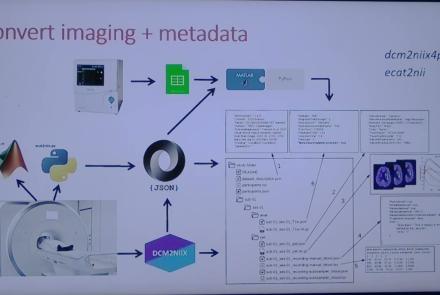
This session introduces the PET-to-BIDS (PET2BIDS) library, a toolkit designed to simplify the conversion and preparation of PET imaging datasets into BIDS-compliant formats. It supports multiple data types and formats (e.g., DICOM, ECAT7+, nifti, JSON), integrates seamlessly with Excel-based metadata, and provides automated routines for metadata updates, blood data conversion, and JSON synchronization. PET2BIDS improves human readability by mapping complex reconstruction names into standardized, descriptive labels and offers extensive documentation, examples, and video tutorials to make adoption easier for researchers.
Difficulty level: Intermediate
Duration: 9:23
Speaker: : Cyril Pernet
This session introduces the PET-to-BIDS (PET2BIDS) library, a toolkit designed to simplify the conversion and preparation of PET imaging datasets into BIDS-compliant formats. It supports multiple data types and formats (e.g., DICOM, ECAT7+, nifti, JSON), integrates seamlessly with Excel-based metadata, and provides automated routines for metadata updates, blood data conversion, and JSON synchronization. PET2BIDS improves human readability by mapping complex reconstruction names into standardized, descriptive labels and offers extensive documentation, examples, and video tutorials to make adoption easier for researchers.
Difficulty level: Intermediate
Duration: 41:04
Speaker: : Martin Nørgaard
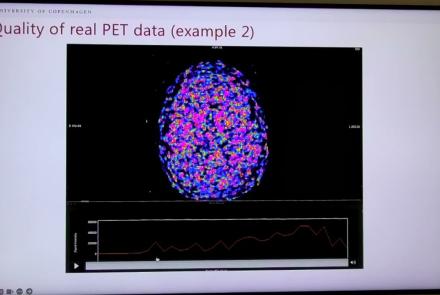
This session dives into practical PET tooling on BIDS data—showing how to run motion correction, register PET↔MRI, extract time–activity curves, and generate standardized PET-BIDS derivatives with clear QC reports. It introduces modular BIDS Apps (head-motion correction, TAC extraction), a full pipeline (PETPrep), and a PET/MRI defacer, with guidance on parameters, outputs, provenance, and why Dockerized containers are the reliable way to run them at scale.
Difficulty level: Intermediate
Duration: 1:05:38
Speaker: : Martin Nørgaard

This session introduces two PET quantification tools—bloodstream for processing arterial blood data and kinfitr for kinetic modeling and quantification—built to work with BIDS/BIDS-derivatives and containers. Bloodstream fuses autosampler and manual measurements (whole blood, plasma, parent fraction) using interpolation or fitted models (incl. hierarchical GAMs) to produce a clean arterial input function (AIF) and whole-blood curves with rich QC reports ready. TAC data (e.g., from PETPrep) and blood (e.g., from bloodstream) can be ingested using kinfitr to run reproducible, GUI-driven analyses: define combined ROIs, calculate weighting factors, estimate blood–tissue delay, choose and chain models (e.g., 2TCM → 1TCM with parameter inheritance), and export parameters/diagnostics. Both are available as Docker apps; workflows emphasize configuration files, reports, and standard outputs to support transparency and reuse.
Difficulty level: Intermediate
Duration: 1:20:56
Speaker: : Granville Matheson